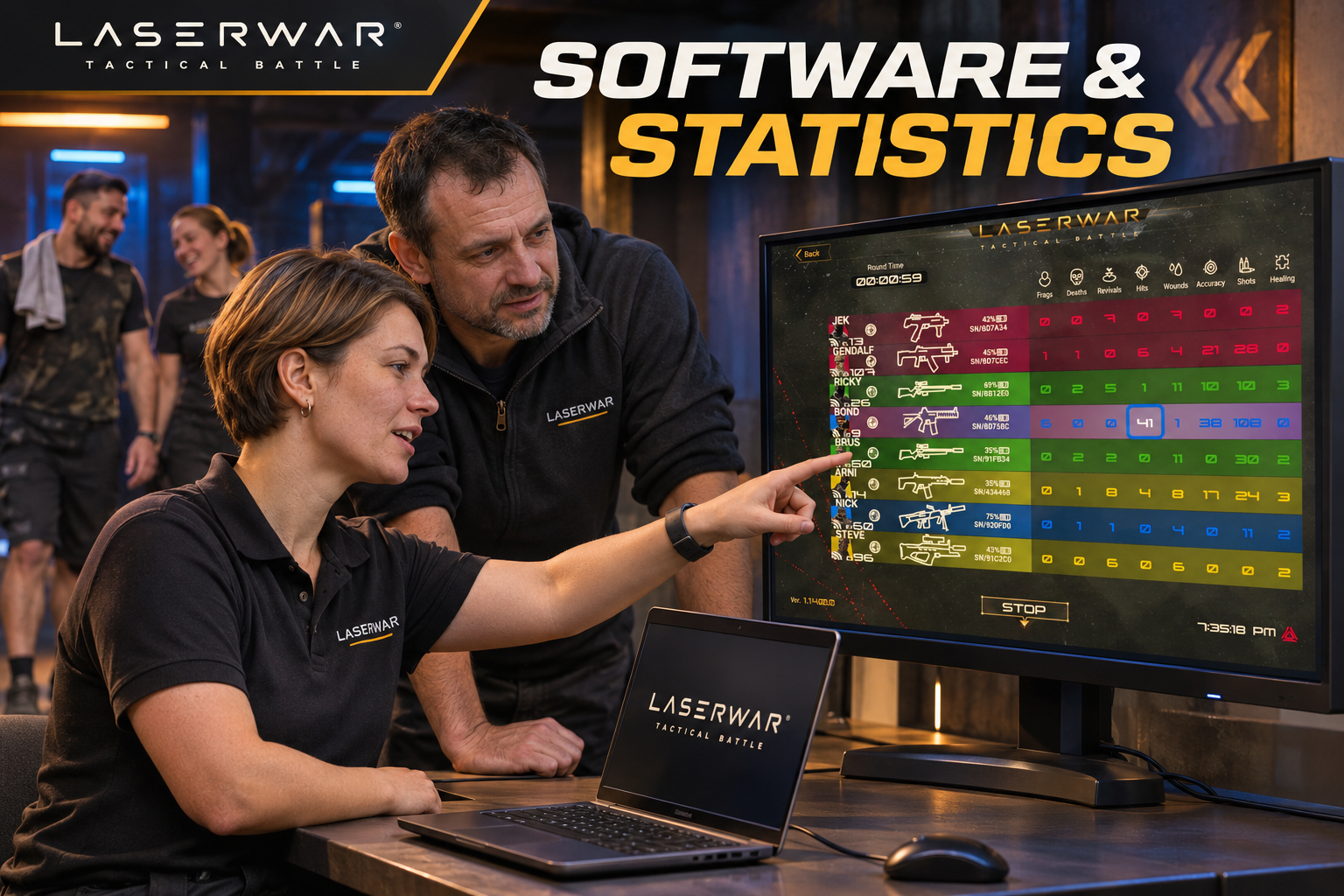
A scoreboard should help an instructor run a better session and give players a reason to talk about their game. The useful question is what happens from check-in to the saved report: which software controls your equipment, where the data travels, and what still works when the venue loses its internet connection.
This guide describes a practical operating routine for a US club using LASERWAR equipment. It covers 10th-generation X-Gen and 11th-generation ALPHATAG, with older generations included in the comparison. The example routine below is an operating template you can adapt to your club.
Start with three different connections
Internet, local Wi-Fi and a device-to-device connection do different jobs. A router can create a local game network even when its internet connection is unavailable. Your equipment and control device must still have the right connection to one another.
For local play, game data can be retained by the equipment and collected afterward. A live display adds a local network path to the controller and screen. Downloading software or firmware, and posting results to an internet service, are separate tasks. Prepare those before opening, or complete the upload when internet access returns. LASERWAR's explanation of statistics collection describes the difference between end-of-game collection and the Wi-Fi system used by X-Gen.
What this means during an outage: losing the internet connection does not automatically mean losing the local game network. Losing local Wi-Fi coverage affects the live view. Plan and test those two situations separately.
In X-Gen's documented architecture, a set can accumulate events while it is out of access-point coverage and transfer them when it reconnects. Until that happens, a display can be missing recent events from that player. Avoid treating a temporarily incomplete board as the final result. Read the complete session before announcing the winner.
X-Gen / ALPHATAG connected workflow
Local network and internet shown connected. Local control and reporting use the venue network; internet services use the separate uplink. This is an architecture illustration, not a live device test.
Choose the workflow by generation
The matrix describes the published capabilities of each family. Match the installed app, equipment generation and firmware before applying it to your fleet. “Online statistics” here describes a connected game workflow; it should not be confused with a requirement for a cloud scoreboard.
| Equipment | Control software | During the game | After the game | Connection to plan |
|---|---|---|---|---|
| Generations 4–9 | LASERTAG Configurator; supported Windows and Android versions | Classic offline collection | Read sets and assemble the results | Compatible local Bluetooth / configuration connection |
| Generation 10 · X-Gen | LASERWAR X-Gen Configurator for Windows | Live statistics over local Wi-Fi; buffered events outside coverage | Review results; save a PDF | Local router, compatible Windows controller and equipment on the intended network |
| Generation 11 · ALPHATAG | ALPHATAG Server / current ALPHATAG Configurator; current Configurator is available for Windows, Android and iOS | Connected game control and live view; offline statistics also supported | Read and review local statistics; save a PDF | Local Wi-Fi for the connected workflow; matching app and firmware for the fleet |
Sources: X-Gen features and export; generation compatibility, August 2026; current ALPHATAG Configurator functions; ALPHATAG round review and supported platforms.
Mixed fleets need particular care. LASERWAR distinguishes gameplay compatibility from complete statistical reporting: equipment from different generations can take part in the same game, while a mixture of Gen 4–9 and Gen 10/11 can prevent full statistics. Before combining an older rental fleet with new sets, run a short recorded session using every generation you intend to issue. Compare the final report with the actions actually performed.
Before opening: make the next session repeatable
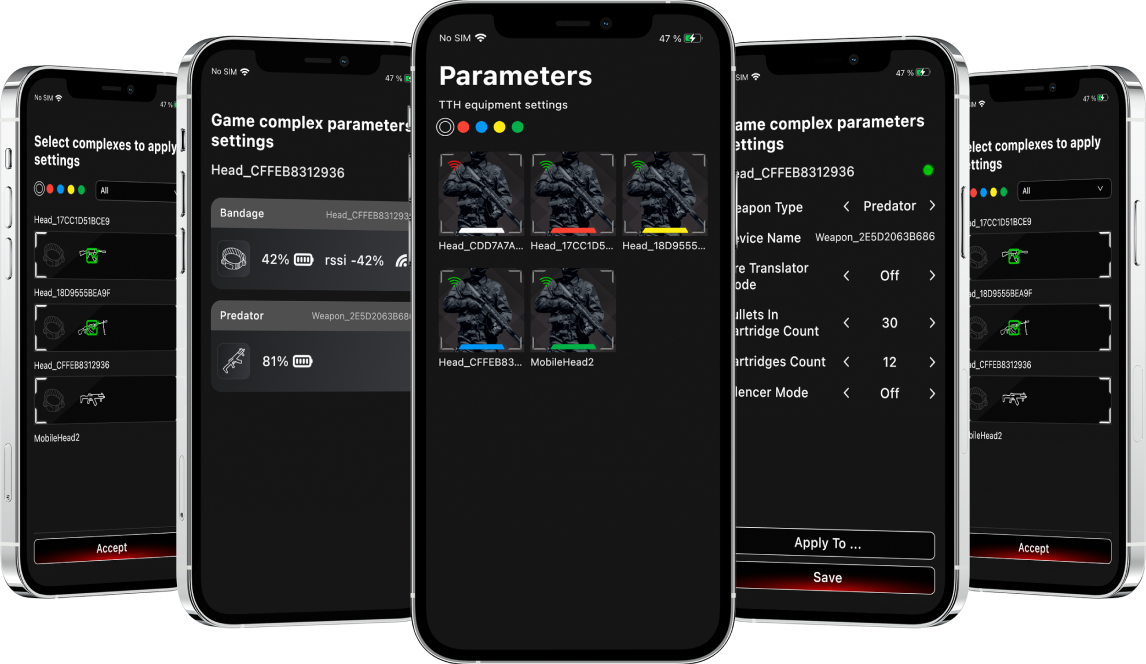
Keep a short fleet record with each set's label, generation, tagger and sensor identifiers, app version and firmware versions. A player nickname is useful on the scoreboard; a stable equipment label is useful when tracing a fault. Keep the two separate in your operating notes.
Prepare a small library of tested scenarios: one straightforward introductory round, one team objective and one progression for returning players. Record the scenario's scoring rules alongside its name. A team that changes the definition of a hit or elimination between rounds makes meaningful comparisons harder, even when the software has collected every event correctly.
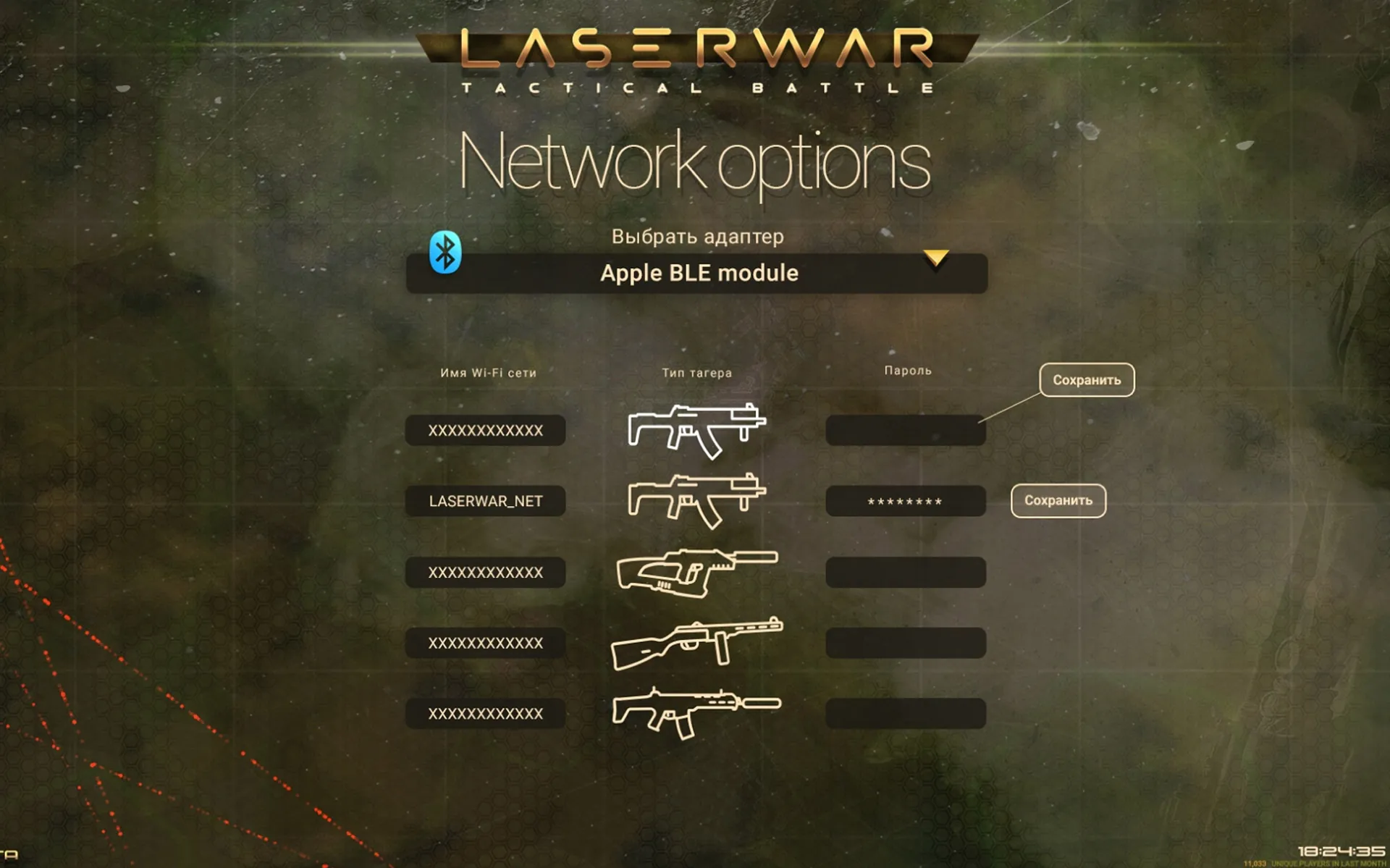
For X-Gen, the official setup guidance calls for a Wi-Fi router and a Windows controller. Use the operating-system requirements shown by the current official download for the computer you are actually buying. For ALPHATAG mobile operation, connect the instructor's device to the game router. LASERWAR documents a portable router setup powered by a power bank in its mobile Configurator guide.
Give the game network a documented name and keep staff access details in the club's controlled operating notes. Keep the controller powered, check the display connection and walk the usable play area with a test set. A guest phone showing strong Wi-Fi at reception does not establish coverage at the far end of the field.
A practical club routine: one group, two rounds, one useful debrief
Consider a birthday or team event with two groups that will swap sides after the first round. The instructor's job is to preserve a clear link between people, equipment and results. The routine can stay simple.
- Issue and identify. Fit each player with a checked set. Confirm the equipment label and the nickname that will appear in the results. Check that no two issued sets have the same gameplay identifier.
- Assign teams and rules. Select the tested scenario, explain the objective, then confirm team colors and individual roles in the controller. Tell players how the winner will be decided before starting.
- Run a short function check. Demonstrate a hit, an elimination and a respawn under controlled conditions. Confirm the equipment response and the relevant software view. Resolve an issue before the timed round begins.
- Monitor with a purpose. Watch the score and equipment status available in your software. A sudden absence of updates is a reason to check coverage and the set; it is not enough by itself to decide what happened on the field.
- Finish and reconcile. Bring sets back into the collection area, complete the readout and confirm that every issued set appears. Check the session boundary before combining rounds.
- Save, explain, repeat. Save the report before clearing data. Give a short debrief, change sides or roles, and start the next round using the same documented rules.
For an offline ALPHATAG game, keep IDs stable during the session. LASERWAR's offline-statistics update notes explain why duplicate or changed player IDs can prevent a correct report. The same discipline makes an instructor's own session log easier to follow.
Turn the report into something players understand
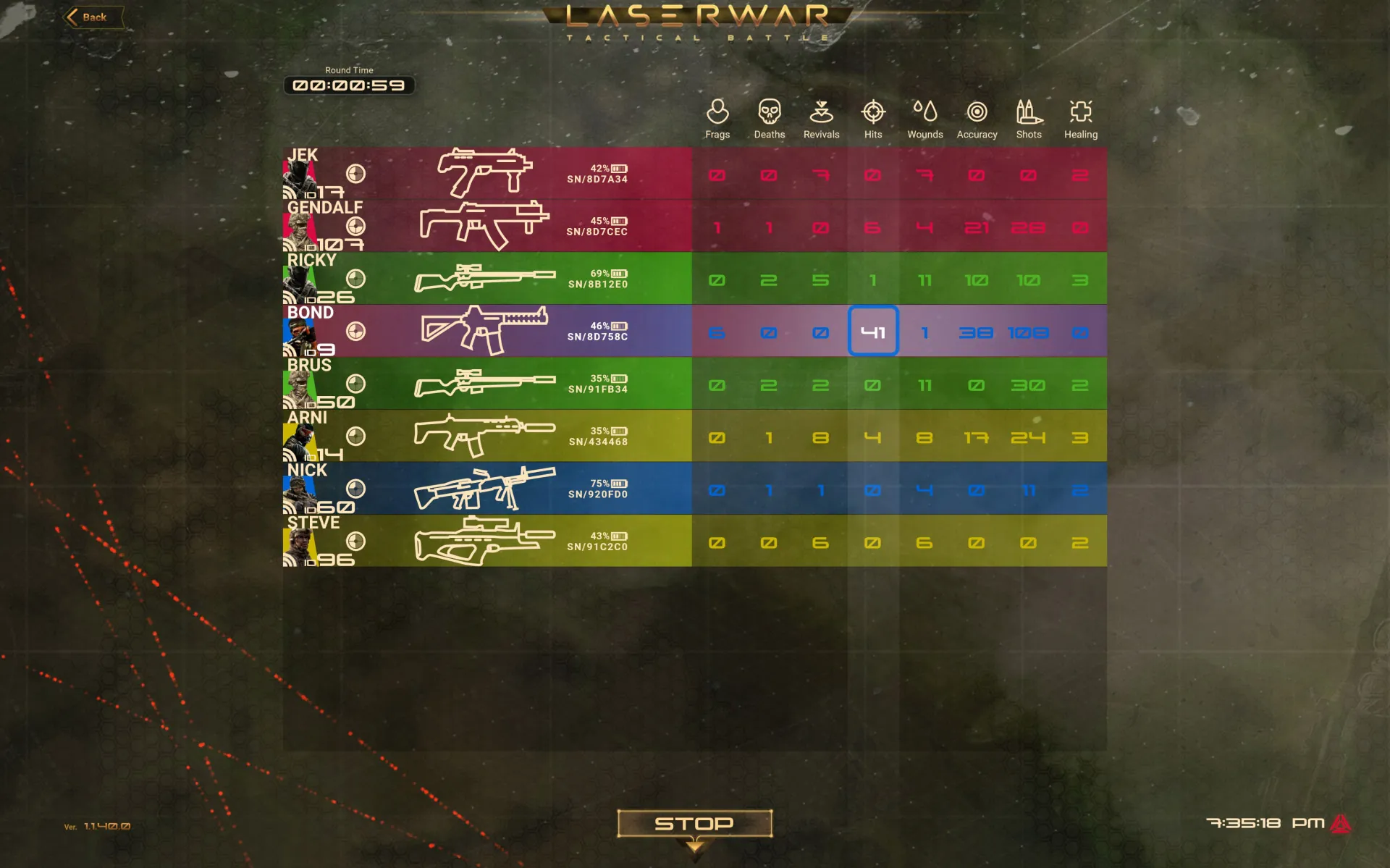
Start with one team result and one useful observation for each player. A dense page of numbers is less helpful than a specific connection to something the player remembers doing. ALPHATAG's published round-review guide covers shots, hits, damage, eliminations, achievements and other session indicators. Use the fields present in the report generated by your version.
| Pattern in the report | What to check | Useful next-round challenge |
|---|---|---|
| Many shots, few hits | Distance, aiming and the opportunities the player took | Pick a clearer line of sight and take more deliberate shots |
| Many hits and many eliminations suffered | Exposure, movement and the assigned role | Advance with a teammate and use cover between attempts |
| A lower personal score in an objective game | Whether the player was defending, carrying or completing an objective | Review the team's objective result before judging contribution |
| An unexpected gap in one player's data | Set identity, collection completion and network coverage | Resolve the record before comparing that player's performance |
These are discussion prompts, not automatic diagnoses. A low hit count alone cannot tell you that a player aimed badly. The scenario, position and equipment record provide the context. For returning players, compare rounds run under similar rules and explain any changes that affect the score.
Save a useful report, then share it
PDF export is documented for X-Gen and ALPHATAG Configurator. Make that the dependable handoff: save the session under a filename such as 2026-11-08_group-b_round-02.pdf, open it and confirm that the expected players and round appear. Keep a copy in the club's session archive before preparing a customer copy.
The January 2026 ALPHATAG update confirms local storage of offline game statistics on the instructor's device. That is useful when reviewing a mobile event away from the venue. Plan an ordinary backup routine for the control device, and verify that a saved report opens after the session has closed.
For a customer-facing scoreboard, nicknames often make the result easier to read. For anything you intend to publish, use the club's agreed permission process, particularly for school groups and children. Send the relevant group's results rather than an unrelated customer list. A software feature that can save or publish information does not decide which information the club should share.
Prove the workflow before a busy weekend
Use a brief acceptance session with the actual set, router, controller and screen. First run it with the venue internet connection unavailable while keeping the local game network active. Confirm game control, collection and local report saving. Then test a planned coverage gap and verify the later readout. Finally, restore internet access and try the sharing process you intend to offer customers.
Record the app and firmware versions, which sets participated, what was checked and what passed. Keep a report and screenshots from that session with the fleet record. Repeat the relevant checks after an update or a network change. Schedule software changes outside trading hours so there is time to investigate a mismatch.
ALPHATAG's older Player app has a different compatibility boundary from the current instructor Configurator. LASERWAR's mobile announcement identifies the legacy Player limitation for newer equipment. Download through the official software hub and choose the app for the generation you operate.
Build your club's software handover
Send LASERWAR your equipment generations, fleet size, controller platform and proposed play-area layout. Ask for a matching software and firmware list, the local-network requirements and a demonstration of the saved PDF from that configuration.
Open software and support resources

